




Coming soon to the App Store

Everyonehasa
rabbitholeortwo.

There’s nothing wrong with that. Up For Air locks yours, so you don’t have to rely on willpower. Earn minutes with a walk or a workout, then dip in and come back up at a time you choose.

Get notified

Free for iPhone and iPad · iOS 18 or iPadOS 18 or later

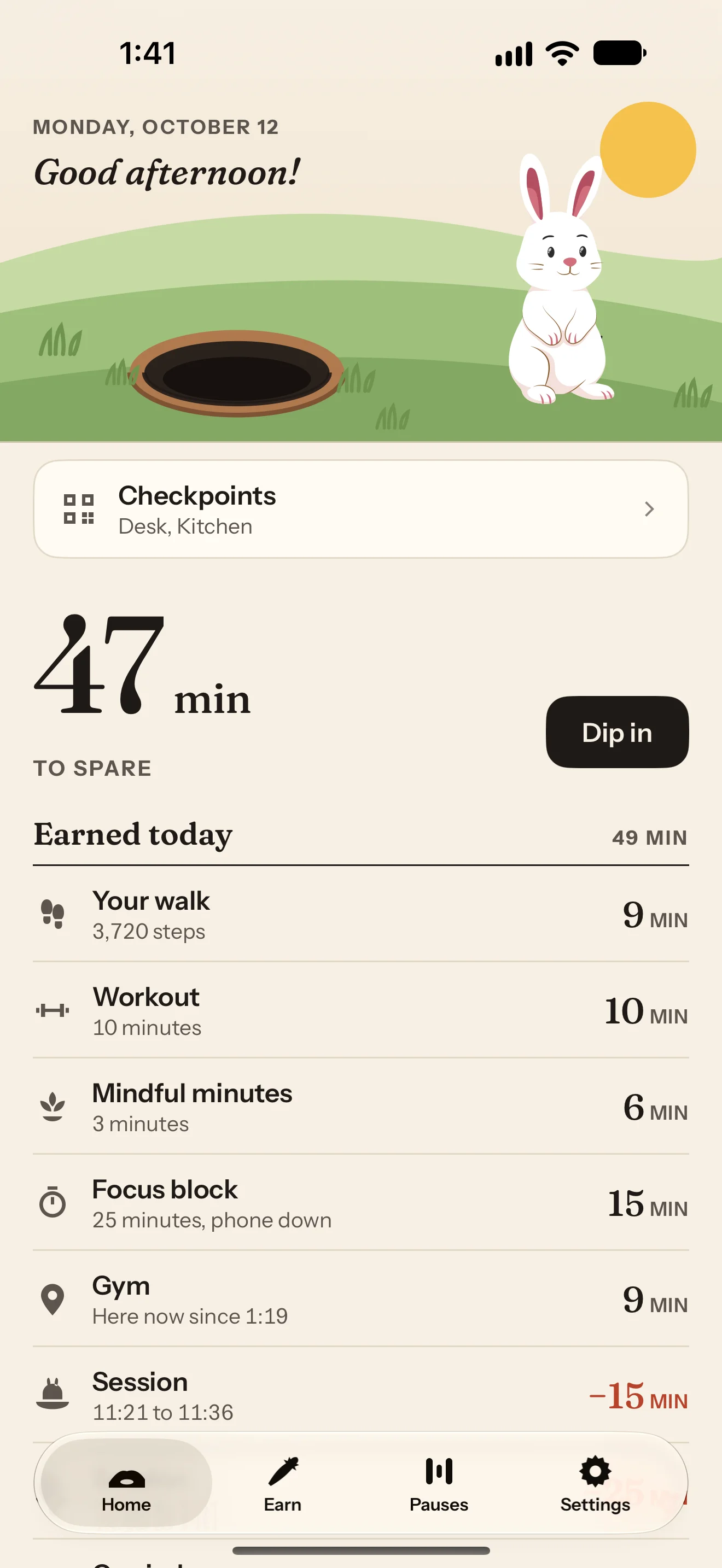
Up For Air’s Home screen at 1:41 on Monday, October 12. Under the greeting “Good afternoon!”, a white bunny stands beside its hole on green hills with the sun overhead. Below are a Checkpoints row listing Desk and Kitchen, 47 min to spare with a Dip in button, and the Earned today list totaling 49 min: your walk, 3,720 steps, 9 min; a workout of 10 minutes, 10 min; mindful minutes, 3 minutes, 6 min; a focus block, 25 minutes with the phone down, 15 min; the Gym, here now since 1:19, 9 min; and a session from 11:21 to 11:36, −15 min.

Activity first, minutes second.

Your walk earned 6 min.Your workout earned 10 min.25 minutes, phone down, earned 15.You’re at the library. 5 min earned.Five mindful minutes earned 10.Your nap earned nothing. Still a good nap.Back up at 3:40.
How it works

Lock. Earn. Dip in.

The whole app, in three sentences.

  1. Choose your rabbit holes.

    Lock the apps, whole categories, and websites that swallow you. Screen Time keeps them locked until you choose to open them.

  2. Earn minutes up top.

    The things you do in the real world earn minutes: a walk, a workout, mindful minutes, a focus block, the places you go.

  3. Spend them when you like.

    Open a rabbit hole and we’ll ask how long. You choose, and we bring you back up at a time you can see on the clock.

Features

Up top, down there, and back.

Rabbit holesEdit

Apps · 3

  • InstagramMatched to Instagram
  • TikTokMatched to TikTok
  • YouTubeMatched to YouTube
  • Lock another app…

Categories · 1

  • Games
  • Lock a whole category…Social, Games, Entertainment, and so on, as Apple groups them.

Websites · 1

  • reddit.com
  • Lock a website…
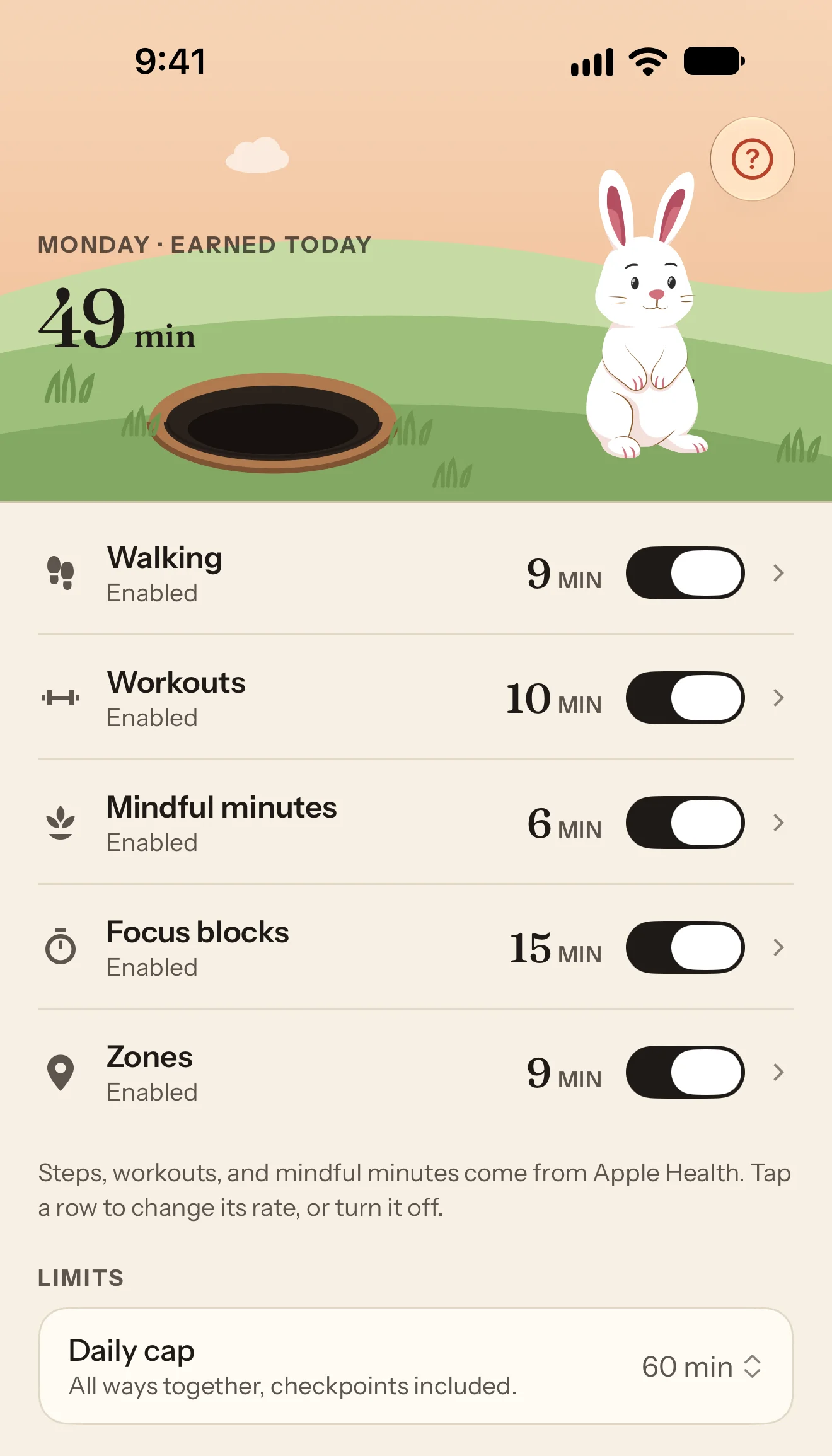
The Earn tab at 9:41. The plate reads “Monday · Earned today, 49 min” beside the standing bunny, with a help button at the top right. All five ways are switched on and labeled Enabled: Walking (9 min), Workouts (10 min), Mindful minutes (6 min), Focus blocks (15 min), and Zones (9 min). A note says “Steps, workouts, and mindful minutes come from Apple Health. Tap a row to change its rate, or turn it off.” Under Limits, the Daily cap is 60 min, “All ways together, checkpoints included.”
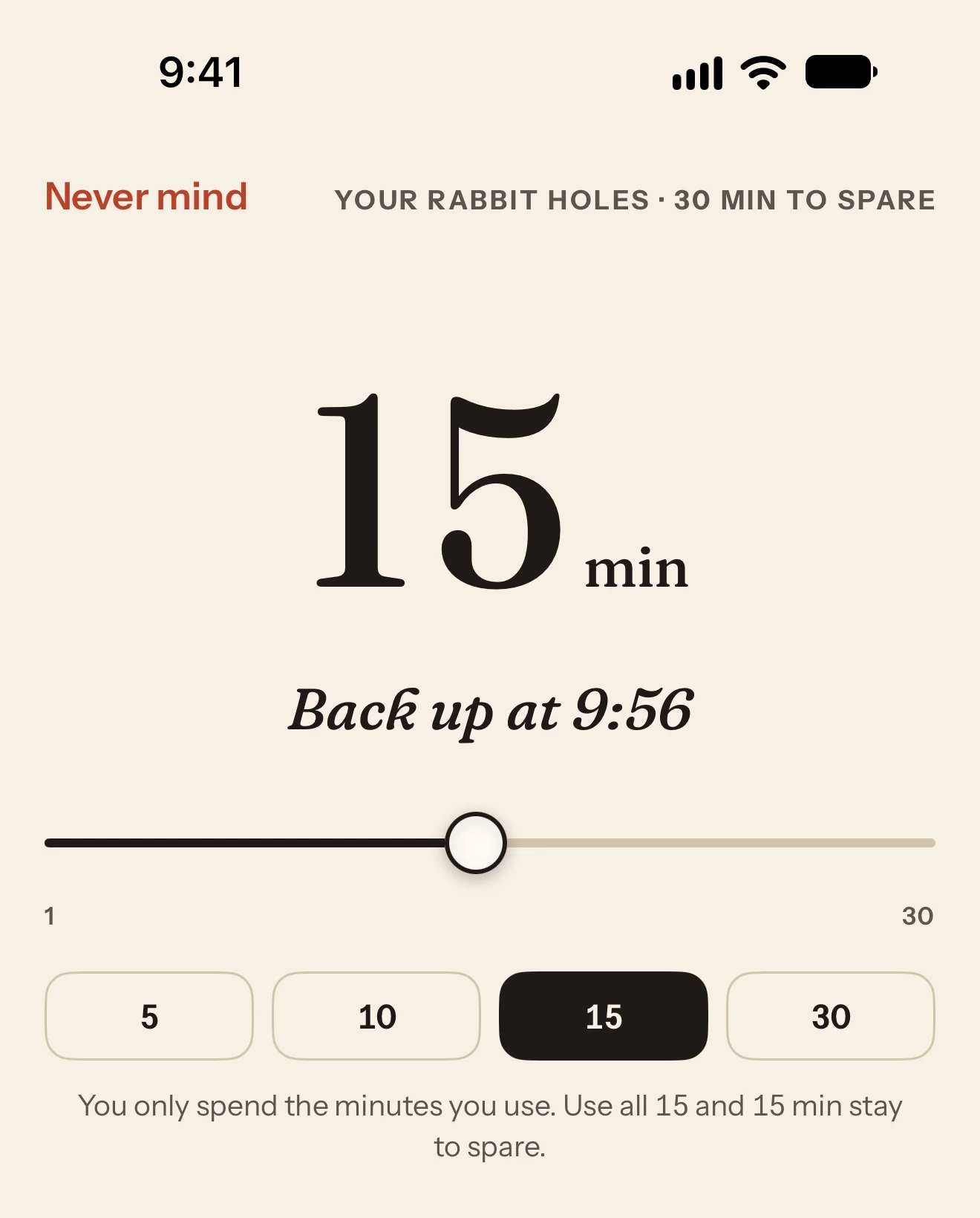
The screen that asks how long before you dip in, at 9:41. At the top are Never mind and “Your rabbit holes · 30 min to spare”. A large “15 min” sits over “Back up at 9:56”, then a slider from 1 to 30 and quick picks 5, 10, 15, and 30, with 15 selected, and the note “You only spend the minutes you use. Use all 15 and 15 min stay to spare.”
Pauses

The app that asks nicely.

Turn on a pause and you get a small moment before you dip in: a quick sum, a deep breath, a short poem, or a word from the bunny. Turning back never counts as an unlock, so it never makes the next one harder.

The bunny

Do I have to go down in the rabbit hole? The clover just came up and I haven’t had a nibble!

Hold your answer to choose it.

More up top

Little things that keep you up top.

It works where your day happens: at your desk, at the gym, and on your Lock Screen.

  • Checkpoints

    Keep an NFC tag or a printed card where the habit lives, like your desk or your bedside. Tap your tag or scan your card to start. Do it again to stop. Until you do, your rabbit holes stay locked, and 30 minutes or more earns 10 min.

  • Zones

    Draw a circle around the gym, the library, or the park. Arriving earns 5 min, and every 5 minutes you stay earns 1 more. With location set to Always, it counts even when the app is closed. We never record where you go.

  • Your week up top

    Seven suns sized by the minutes you earned, and a small dot for a rest day. There’s no chain to keep and nothing to break.

  • Back up at 3:40, everywhere

    A Live Activity shows the countdown to your time on the Lock Screen and in the Dynamic Island. Widgets show your minutes to spare, Control Center starts a focus block in one tap, and Siri can tell you how many minutes you have.

  • Your accountability bunny

    Give it a name, and it keeps you company. It waves hello, shares a tip now and then, and peeks from its hole while you dip in.

  • No account, no server

    No ads either, and nothing is ever sent to us. Your minutes, your zones, and your Health data stay on your device.

Pricing

Try it all, free for 21 days.

Premium is everything on this page. We’ll remind you before your free trial ends.

Save 46%

Free

$0

Everything you need to lock a rabbit hole and earn the minutes that open it.

Continue with Free

Free stays free.

Including:

  • Earn and spend minutes
  • Two apps, two categories, two websites
  • One way to earn minutes at a time
  • One checkpoint
  • Pauses, widgets, and Shortcuts

PremiumBest value

$44.99a year

$3.75 a month

Every way to earn minutes, unlimited rabbit holes, zones, and checkpoints.

Start 21 days free

Free for 21 days, then $44.99 a year. Cancel anytime.

Free, plus:

  • All five ways to earn minutes, at once
  • Unlimited rabbit holes
  • Zones: places that earn minutes
  • As many checkpoints as you like
Questions

Everything you need to know.

Short answers, in the app’s own words.

Yes. Screen Time, built into iPhone and iPad, keeps your rabbit holes locked until you spend minutes to dip in. Apple asks your permission first.

Then Up For Air offers you a focus block instead. 25 minutes with your phone down earns 15 min, and a 4,000-step walk earns 10.

Up For Air is free to download. Premium, with everything on this page, is $44.99 a year with the first 21 days free, or $6.99 a month. We’ll remind you before the trial ends, and you can cancel anytime. The plans above show what each one includes.

Only the ones you choose. Your Daily cap starts at 60 min for all the ways together, and you can choose 30, 90, or 120 min, or no cap. Earning also stops while you have 180 min to spare, and you can change that too. Both keep a long walk from becoming a long scroll.

Steps, workouts, and mindful minutes, read only, on your device. From a workout it reads only how long it lasted, and it never changes your Health data.

Nothing happens. A rest day is a small dot in your week up top, and you keep every minute you have to spare.

No. Only the rabbit holes you choose are locked, and everything else on your iPhone or iPad works as it always does.

Any iPhone or iPad running iOS 18 or iPadOS 18 or later.

Ready to come up for air?

Lock a rabbit hole, earn some minutes up top, and see what 3:40 feels like.

Get notified

Free for iPhone and iPad · iOS 18 or iPadOS 18 or later